4.2.12 Invoking ide verify 
The ide verify command runs the dzn verify command.
If verification errors are found, the ide daemon provides
a sequence view that can be viewed with a browser.
ide ide-option... verify option... FILE
Running
ide verify examples/compliance_provides_bool.dzn
will have the trace.html view show
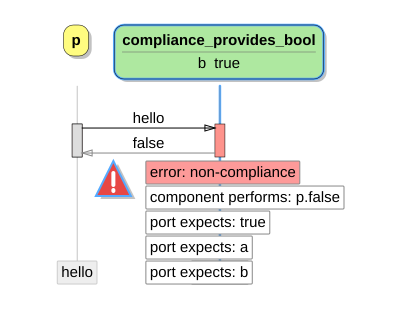
Note: The trace view, which is generated by the simulator, will only show compliance errors when the verificator found a
compliance error. This means that when the model has errors such asdeadlock,illegal,non-determinism,missing reply,second reply,queue full, orrange error, anycompliance erroris ignored.
The options can be among the following:
--help-hDisplay help on invoking
ide verify, and then exit.--import=dir-I dirAdd directory dir to import path.
--model=model-m modelLimit verification to model, and for behavioral component model, to its interfaces.
--no-constraint-CDo not use a constraining process.
Note: Verification cannot be applied to system components models; verifying a system model is a no-op.
--no-interfacesDo not verify a model’s interfaces.
--no-unreachable-UDisable the unreachable code check. For large models the unreachable code check may have a serious performance impact.
--queue-size=size-q sizeUse component queue size size for verification, the default is
3.--queue-size-defer=sizeUse defer queue size size for verification, the default is
2.--queue-size-external=sizeUse external queue size size for verification, the default is
1.--verbose-vBe more verbose, show progress.